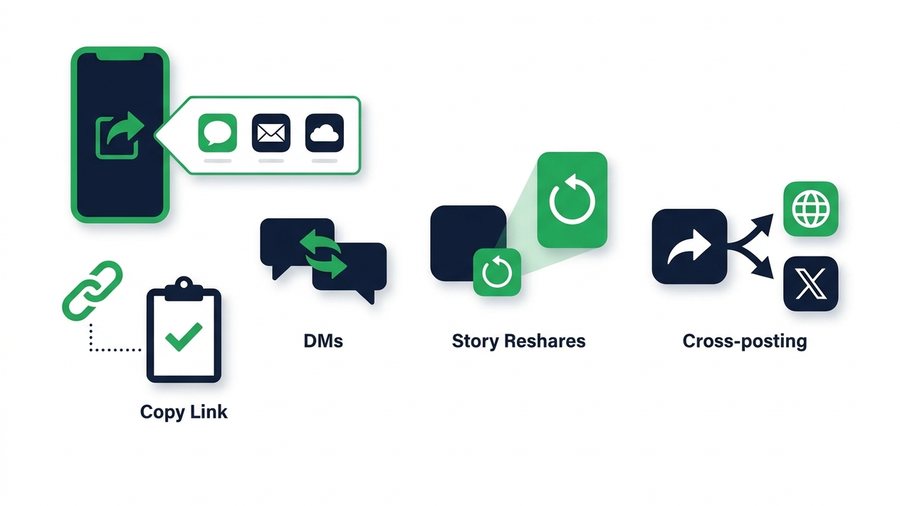
You found a post worth passing along, and now you want it in your group chat, on your Facebook page, or in a text to a friend who does not even use Instagram. Instagram makes this easy, but the options behave differently depending on privacy settings, and picking the wrong one leaves your friend staring at a login wall.
Most people just tap the paper plane and hope. That works sometimes, but understanding the four or five real routes off Instagram saves you from broken links and awkward "I can't see it" replies.
This guide walks through the share sheet, copying links, sending by DM, resharing to your story, and cross-posting to Facebook and WhatsApp. It also covers what changes for private accounts and how to handle credit when the post is not yours. Everything here uses Instagram's official features, plus one clean way to send original files off the platform.
Key takeaways
- The share sheet never exports the raw file - Every built-in option sends a link, not the photo or video.
- Copy link is the universal route, but a link to a private post shows a login wall to non-followers.
- A story reshare lasts 24 hours and automatically credits the creator's username.
- To send the actual file off-platform, upload your original to ShareIt.onl (up to 100 files or 3 GB, no account).
The Share Sheet Is Your Starting Point
Under almost any post or reel is a paper plane icon. Tap it and Instagram opens the share sheet, your hub for sending content out. From here you can DM it, add it to your story, copy the link, or hand it to your phone's system share menu, which lists other apps like Messages, WhatsApp, and email.
The system share row is the key to reaching apps beyond Instagram. Tap Share to... or the app icons, and your phone takes over, letting you drop the post into whatever app you choose. What actually gets sent, though, is usually a link, and links obey privacy rules. That detail decides whether your share works.
What Gets Sent: Link or File
Instagram never exports the raw photo or video through the share sheet. It sends a link that opens the post back inside Instagram or a browser. So "sharing to WhatsApp" means sending a clickable preview, not the actual image file. If someone needs the real file, that is a different job, covered near the end of this guide.
Copy Link: The Universal Option
Copy link is the most flexible tool in the share sheet. Tap it, and Instagram copies a web address you can paste anywhere: a text, an email, a Slack channel, a Notion page, or any app at all.
Because it is just a URL, it works even where Instagram has no share integration. The one condition is privacy. A link to a public post opens for anyone. A link to a private account's post shows a login or error screen to people who do not already follow that account.
Where Copy Link Shines
- Emailing a post to a coworker or client.
- Dropping a reel into a team chat like Slack or Teams.
- Texting a post to someone who does not have the Instagram app.
- Saving a reference link in your notes for later.
DMs and Story Reshares
Sending by DM keeps things private and precise. Pick a person or a group chat, add a note, and send a preview card that opens in-app. Group chats support a large number of people, so a single DM can still reach a real audience without going public.
Add to your story reshares a post publicly to your followers for 24 hours, but only if the original poster allows resharing and the account is public. The reshare automatically shows the creator's username and links back to the source, so credit is handled for you. This is the polite, built-in way to amplify someone else's public post.
Cross-Posting to Facebook and WhatsApp
Because Instagram and WhatsApp are both Meta apps, sharing between them is smooth. From the share sheet, choose WhatsApp and the post link drops into a chat with a preview. Same idea for Facebook, where you can post the link to your feed, a group, or a page.
Note: Even between Meta apps, what travels is still a link, not the image. So a WhatsApp contact who does not follow a private account will only see a login wall when they tap it, no matter how smoothly the share went through.
Here is how the main routes compare at a glance.
| Method | Reaches | Works for private posts? | Sends a link or file |
|---|---|---|---|
| Copy link | Anyone, any app | Public only | Link |
| DM in Instagram | 1 person or group | Approved followers | Link (in-app) |
| Add to story | Your followers, 24h | Public, if allowed | Link card |
| Share to WhatsApp | Any chat | Public only | Link |
| Share to Facebook | Feed, group, page | Public only | Link |
| Send original file | Anyone, any device | N/A, your own file | Actual file |
The pattern is clear: every built-in route sends a link, and every link respects privacy. If the post is private, off-platform sharing basically does not work for outsiders.
Private Accounts and Sharing Limits
Private accounts exist to limit reach, and Instagram enforces that when you try to share out. A few rules to keep straight:
- Posts from private accounts cannot be reshared to your story.
- A copied link to a private post is useless to anyone who does not follow that account.
- DMs of private posts only reach people who also follow that account.
- If you want something private shared widely, the account has to be public, or the owner has to send it themselves.
Credit and Permission When It Is Not Yours
Sharing someone else's work carries a simple responsibility. Follow this quick checklist:
That last point matters legally: third-party downloader sites and browser extensions that rip content you do not own violate Instagram's Terms of Use and usually copyright law. This guide uses official methods only. If you want a copy of someone's work, ask them to send the file directly. To see every reshare tool in depth, the complete guide to sharing posts, reels, and stories breaks it all down.
Sending the Actual File Off-Platform
Sometimes a link is not enough. A client wants the real photo, an editor needs your video, or someone printing your image needs full resolution. Instagram's share sheet cannot do this, because it only ever sends a compressed link, not the source file.
For real files, work from your originals. If it is your own content, save it first (here is how to save your own Reels), then send the source. Upload it to ShareIt.onl, no account needed, up to 100 files or 3 GB per batch, and send the expiring link or let the person scan the QR code in person. Nothing gets recompressed, the file works on any device with or without Instagram, and the link expires on its own so nothing lingers online. If you are sending a full multi-image set, the carousel and photo dump guide covers keeping the whole batch sharp.