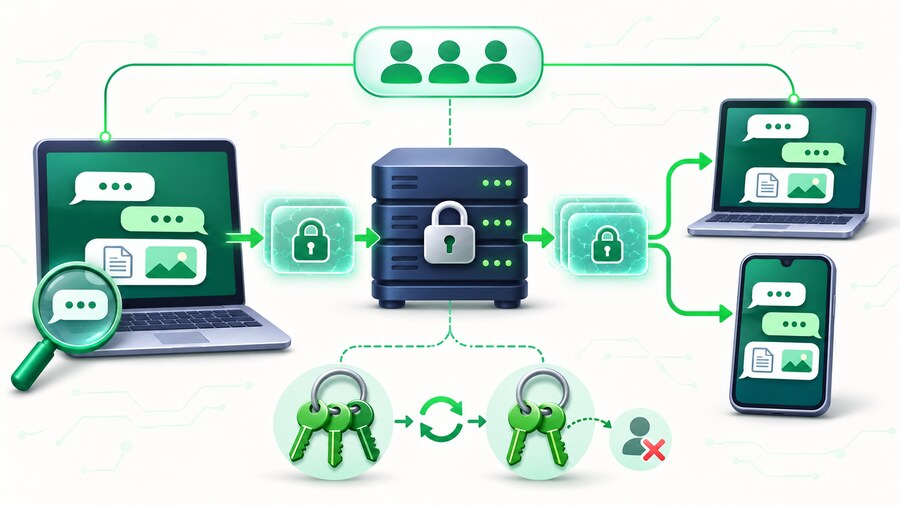
End-to-end encrypted group chat means readable content is locked on a member’s device and unlocked on another member’s device. The service in the middle transports and stores encrypted data, but it does not hold the readable conversation.
That definition sounds simple until a group adds a new member, removes an old one, searches six months of history or reports abuse. A serious E2EE design must explain those moments, not just place a lock beside the channel name.
ShareIt private group chat makes encryption a choice when a channel is created. The recommended encrypted mode protects message text, reply previews, reactions, filenames and separate channel file copies in members’ browsers. Standard mode stores readable messages and regular ShareIt links. The mode cannot be switched later.
Key takeaway: E2EE reduces the trust you place in the service, but increases the responsibility placed on members and their devices.
What is protected
In an encrypted ShareIt channel, the browser encrypts the content with AES-256-GCM before upload. The server receives ciphertext and the metadata needed to route and synchronize it.
The protected payload includes:
- Message bodies
- The readable preview attached to a reply
- Emoji reactions
- Filenames and attachment details
- Separate file copies created for the encrypted channel
The channel page still needs some operational metadata. The server knows that an account belongs to a channel, when an encrypted record arrived, which channel it belongs to and which encrypted key version applies. It can calculate an unread position without knowing the words.
E2EE is therefore not invisibility. It protects content, not the existence of a relationship or every timing signal.
How group access works
Each encrypted channel has a content key. Members need a wrapped copy of that key that their browser identity can unlock. The user’s recovery passphrase protects the private identity vault; it is not sent as a readable secret to ShareIt.
When a member opens the channel on a recognized browser device, the device obtains the wrapped material it is authorized to use and decrypts locally. The design allows the service to deliver encrypted history without receiving the clear key.
That creates one non-negotiable consequence: ShareIt cannot simply email a reset link that reconstructs a forgotten E2EE passphrase. If the service could silently recover every private key, it would also have a path to decrypt the messages.
What happens when someone is removed
Removing a person from a normal database membership table stops future API access. In an encrypted system, that is not enough by itself because a removed device may already possess the current channel key.
ShareIt starts a new encryption epoch after a permanent removal. Remaining members receive access to the new key; the removed member does not. Future messages use the new version.
Key rotation protects the future. It cannot make a former member forget history that was legitimately decrypted while they belonged to the group. No messaging system can reach into screenshots, exports or human memory.
Why search works differently
Fast server-side search normally requires the service to index readable words. In an E2EE channel, that would break the promise.
ShareIt searches locally instead:
- Press Search or
Ctrl/Cmd + K. - Type at least two characters.
- The browser searches the decrypted messages already loaded.
- Choose Search earlier messages to fetch another history page.
- The browser decrypts that page and adds local matches.
This is private but intentionally less powerful than Slack or Discord search. There is no server-side index of encrypted words, no cross-channel semantic search and no instant query across an enormous archive.
Reporting without pretending moderators can see everything
Moderation is one of the hardest E2EE boundaries. If the service cannot read the conversation, a moderator cannot independently inspect an encrypted message sitting on the server.
ShareIt handles this by asking the reporter for explicit consent to disclose a decrypted snapshot of the selected message and visible attachment details. The reporting member chooses to send that readable evidence. In a standard channel, moderators can review the stored readable message.
This is a narrower safety system than a large public platform needs. It fits an invitation-only channel of known people better than a public community containing strangers.
Encrypted files have real costs
An encrypted attachment is a separate channel copy, streamed in chunks and decrypted by the recipient’s browser. The source item remains in the sender’s My Files library.
Because the server lacks the clear file:
- It cannot show a server-generated preview.
- It cannot malware-scan the readable bytes.
- It cannot combine several encrypted files into a normal server-built ZIP.
- Losing the required keys can make the copy unrecoverable.
For routine files where those conveniences matter more, a standard channel may be the practical choice. For sensitive originals, the E2EE boundary may be worth the friction.
That difference becomes concrete in the large-file group chat workflow, where a normal ShareIt link and a separate encrypted channel copy solve different privacy needs.
Threats E2EE does not solve
End-to-end encryption does not protect against:
- An authorized member copying or photographing a message
- Malware on an unlocked member device
- A weak account or device passcode
- Someone sharing an invitation and password carelessly
- Harmful content sent by a legitimate member
- A recipient saving an attachment after decryption
Use membership controls, good account security and a trustworthy group alongside encryption. Cryptography cannot turn an untrusted recipient into a trusted one.
E2EE or standard chat?
Choose E2EE when the group values zero-access content storage and can manage a recovery passphrase. Choose standard chat when easy recovery, service-side moderation and ordinary link behavior matter more.
| Priority | Better starting mode |
|---|---|
| Service must not read message contents | E2EE |
| Lowest setup friction | Standard |
| Encrypted filenames and channel file copies | E2EE |
| Server-readable moderation evidence | Standard |
| Recovery without a separate chat passphrase | Standard |
| Willingness to accept local-search and preview limits | E2EE |
The honest choice is contextual. A vacation-planning channel and a confidential source group should not be forced into the same risk model.
The live chat limits and privacy boundaries turn that decision into specific product behavior, including participant caps, attachment handling, reporting and recovery. Groups making the choice during a platform change can place it before invitations and cutover with the small-group migration plan.
FAQ
Can ShareIt read an encrypted channel?
ShareIt stores ciphertext and routing metadata but is not given the readable content or recovery passphrase. Members’ browsers perform encryption and decryption.
Are channel names encrypted?
No claim is made that every piece of channel metadata is encrypted. The protected payload covers messages, reply previews, reactions, filenames and encrypted channel file details; operational channel and membership records remain server-managed.
Can a new member read old messages?
Access depends on the channel keys provisioned to that authorized member and device. Treat adding a member as granting access to the channel, not merely to future notifications.
Does removing a member erase old history from their device?
No. Rotation prevents access to future encryption epochs. It cannot erase information a former member already decrypted or saved.
Why can’t ShareIt reset my encrypted-chat passphrase?
A conventional reset would require the service to possess or recreate the secret that unlocks the encrypted identity. That would undermine the zero-access design. Store the passphrase safely before relying on encrypted history.