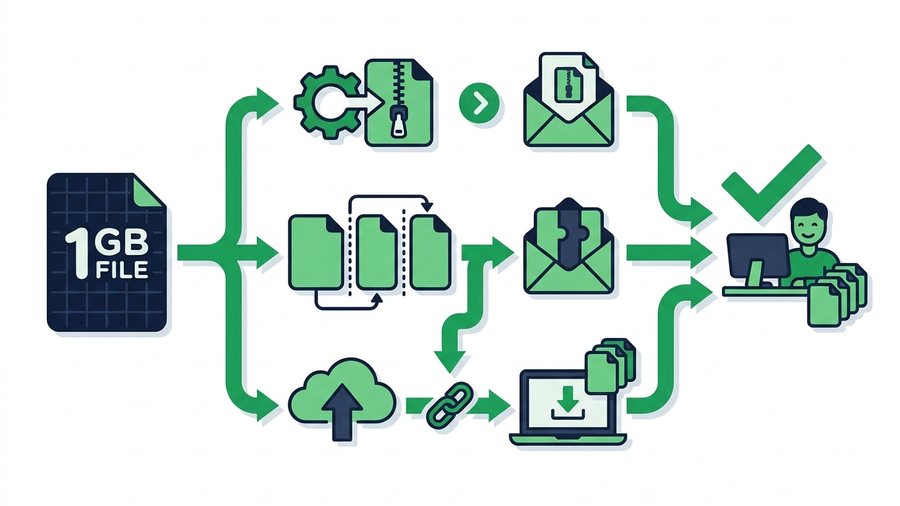
A 1 GB file sounds like a hurdle, but it isn't one anymore. Email won't take it - Most inboxes cap attachments around 25 MB - And chat apps choke or compress it. But a modern share link handles it without breaking a sweat: ShareIt.onl takes up to 3 GB per share free, with no account, so a 1 GB file fits in one upload with room to spare.
The honest answer to "how do I send a 1 GB file for free" is short: upload it, copy the link, send the link. This guide walks through that in a minute, then covers the edge cases - When compressing still saves you time, when splitting is still worth the hassle, and when a file is big enough to need a cloud drive or large-transfer service instead.
Key takeaways
- A 1 GB file fits comfortably in one free ShareIt.onl share - The limit is 3 GB total across up to 100 files, no account needed.
- Compressing (ZIP) can't make video much smaller, but it can shrink documents a lot - Useful mainly to speed up your upload, not to squeeze under a cap.
- Splitting into parts is only needed for tools with small caps, or files bigger than your limit - Not for a 1 GB file on a modern share link.
- For multi-gigabyte jobs beyond 3 GB, a cloud drive or large-transfer service is the right tool.
The Direct Answer: Upload It and Send the Link
For a 1 GB file, the simplest free route works end to end:
- Open ShareIt.onl in any browser - No account, no app.
- Drop in the file. One 1 GB file, or a whole folder's worth - Up to 100 files and 3 GB total per share.
- Pick an expiry: 1 hour, 12 hours, 24 hours (the default), 3 days, or 7 days. Signed in with Google, you can also pick 30 days. Every download keeps the link alive another 24 hours.
- Copy the link (or show the QR code) and send it any way you like. The recipient clicks and downloads - They never need an account.
You can add an optional password, or make it a one-time link that deletes itself after the first download. That's the whole job. The rest of this guide is for the situations where a plain upload isn't the best move.
First, Figure Out What Your 1 GB Actually Is
"1 GB" describes a size, not a shape, and the shape still matters - Not for whether it fits, but for how fast it travels.
- One large file (a long video, a disk image, a big design file) - Upload it as-is. Compression barely helps if it's already a video or photo.
- Many smaller files (a photo shoot, a batch of documents, a folder of clips) - Drop them all into one share. Up to 100 files fit, and the recipient can grab everything with one "Download all (.zip)" click on shares up to 512 MB, or download files individually beyond that.
- Compressible files (Word docs, spreadsheets, raw text, uncompressed images like BMP or TIFF) - A ZIP can shrink these dramatically, which means a much shorter upload wait.
When Compressing Still Helps
Compression no longer decides whether your file fits - It decides how long you wait. On a slow connection, shrinking 1 GB of documents to 200 MB turns a long upload into a short one.
| File type | Typical ZIP savings |
|---|---|
| Word / Excel / text / code | 60–90% smaller |
| Uncompressed images (BMP, TIFF) | 50–80% smaller |
| PDFs (text-heavy) | 10–40% smaller |
| JPEG / PNG photos | Under 10% |
| MP4 video / MP3 audio | Under 5% (already compressed) |
If your 1 GB is documents, zip it and the upload flies. If it's a movie file, don't bother - You'll wait for the ZIP and end up with almost the same size. See our guide to compressing files before sharing for the exact steps on each platform.
Warning: Zipping a video, photo library, or music folder barely shrinks it - Those formats are already compressed. You'll spend minutes zipping to save a few megabytes. Reserve ZIP for documents and uncompressed files.
When Splitting Still Makes Sense
Splitting - Chopping one file into numbered parts the recipient rejoins - Used to be the standard trick for 1 GB files. With a 3 GB free share, you don't need it for this job. It still earns its keep in two cases:
- The tool on the other end has a small cap. If the file must travel through email or a system with a strict limit, splitting into parts that fit under that limit still works.
- The file is bigger than your share limit. A file beyond 3 GB can be split into parts that each fit in a share of its own.
The catch hasn't changed: the recipient must download every part and rejoin them, and missing one piece means the file won't rebuild. It's fiddly, so treat it as the fallback, not the plan. Our guide to splitting a large file into parts walks through the tools in detail.
When to Use a Cloud Drive or Large-Transfer Service
Some jobs really are too big for a quick link. If your file sits just past this one, how to send files larger than 2 GB covers what still works at that size. A 30 GB video project, a full disk image, an archive of raw footage - Once you're past 3 GB, you're in cloud-drive and large-transfer territory. You upload once, get a link, and the recipient downloads the whole file.
The trade-offs: free tiers have their own limits, some require the recipient to have an account, and files may linger longer than you'd like. Compare the options in our roundup of the best free file-sharing services.
A Decision Table by File Size
Match your situation to the simplest method that fits.
| Your file(s) | Best free method | Why |
|---|---|---|
| Up to 3 GB total | A quick link like ShareIt.onl | Fits one free share; no signup, no app |
| 1 GB of documents on a slow connection | Zip first, then share the ZIP | Smaller upload, shorter wait |
| A file that must pass through a small-cap tool | Split into parts under that cap | Each part fits; recipient rejoins |
| Files beyond 3 GB | Large-transfer service or cloud drive | Built for very big single files |
The pattern: a 1 GB file - Even several of them - Is now a plain link job. Only reach for splitting or a heavy-duty service when you're genuinely past the limits.
When 1 GB Is Really "Several Files"
People often say "I need to send a 1 GB file" when they actually mean a folder - 40 vacation photos, a handful of video clips, a set of PDFs. That used to mean batching and multiple links. Now it doesn't: drop the whole folder's contents into one share - Up to 100 files and 3 GB total - And send a single link. One link is easier to make, easier to open, and carries one expiry and one optional password for everything. For the full playbook on big sends, see our send large files hub.
One thing worth knowing if 1 GB files are routine for you: a free account holds 20 GB of files that stay after the link expires, and inviting a friend adds 1 GB of permanent storage on top for each one who joins - up to 80 GB extra, or 100 GB in total. How the referral program works.
A 1 GB file is comfortably inside the free limits - the exact numbers are here.