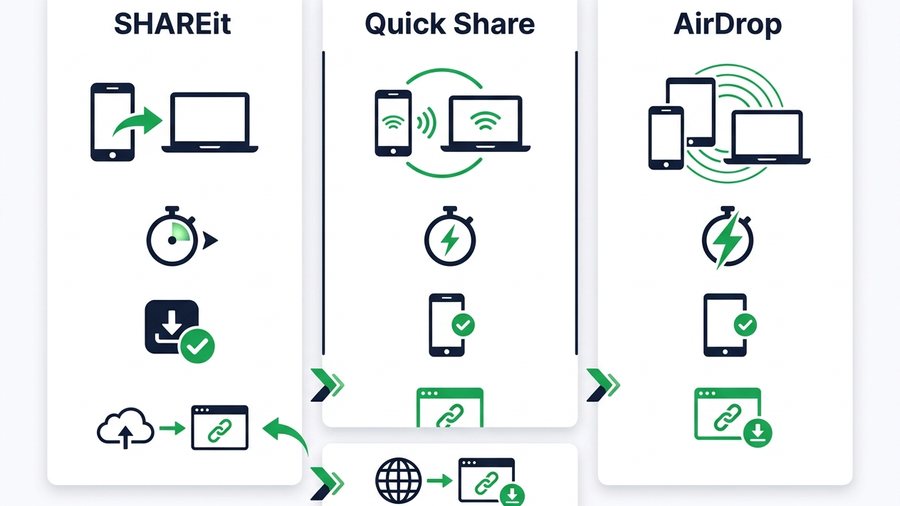
When you want to move files between two devices, three names come up again and again: SHAREit, Quick Share, and AirDrop. They all promise fast, cable-free transfers, but they are built for different worlds. Pick the wrong one and you end up asking someone to install an app they do not want, or discovering it will not talk to their brand of phone at all.
This guide compares the three head to head by platform support, speed, install needs, offline ability, and the big one, cross-brand limits. Then it shows where a browser-based expiring link fits, because sometimes the best tool is the one nobody has to install.
ShareIt.onl is an independent web-based file-sharing tool and is not affiliated with the SHAREit app by Smart Media4U Technology.
Key takeaways
- Quick Share primarily covers Android and Windows, and Google documents AirDrop interoperability on select Android devices.
- SHAREit is the only one that is cross-platform, but it must be installed and open on both devices and shows ads.
- Mixed-device support varies, so a browser transfer remains the predictable iPhone-to-Android route.
- A browser link needs no install, handles 100 files (3 GB total), and auto-expires for one-time shares.
Meet the Three Tools
Each of these took a different path, and that history explains their strengths.
SHAREit
SHAREit is a third-party app you install from the Google Play Store or Apple App Store. Its trick is creating a direct local Wi-Fi connection between two phones so it can move large files offline. It is cross-platform in theory, but both people need the app, and it carries ads and extra features.
Quick Share
Quick Share is Google's built-in sharing feature for Android and Windows, the result of merging Android's Nearby Share with Samsung's Quick Share. It is baked into modern Android phones, so there is usually nothing to install, and it uses Bluetooth plus direct Wi-Fi for speed.
AirDrop
AirDrop is Apple's built-in feature for iPhone, iPad, and Mac. It is fast, needs no app, and uses no mobile data. Its one hard limit is that it only talks to other Apple devices. If you want that same convenience beyond the Apple wall, our guide to AirDrop for Windows and sending to any device covers the workarounds.
Side-by-Side Comparison
Here is how the three line up on the things that usually decide the choice.
| Feature | SHAREit | Quick Share | AirDrop |
|---|---|---|---|
| Made by | Smart Media4U Technology | Apple | |
| Works on | Android, iOS, PC | Android, Windows | iPhone, iPad, Mac |
| Needs an install | Yes, both devices | Built in on Android | Built in on Apple |
| Works offline | Yes, local Wi-Fi | Yes, local Wi-Fi | Yes, local Wi-Fi |
| Uses mobile data | No | No | No |
| Cross-brand (Android to iPhone) | In theory, both need app | Select Android devices | Select Android devices |
| File size cap | Very high | Very high | Very high |
| Ads | Yes | No | No |
| Cost | Free | Free | Free |
All three are fast for local transfers because they use a direct device-to-device link rather than uploading to the internet. The real differences are who can use them and whether an install is required.
Speed, Install, and Offline Notes
Speed
For sending a big video across the room, all three are quick because none of them route through the internet. Real-world speed depends more on the two devices' Wi-Fi hardware and how close they are than on which app you use. Do not expect a dramatic gap for everyday files.
Install needs
This is where they split. Quick Share and AirDrop are already on the phone, so half the setup is done. SHAREit must be installed on both devices, and both must have it open. If you are sending to someone who does not already use it, that install step is real friction.
Offline ability
All three can move files with no internet connection, since each builds its own short-range Wi-Fi link. That makes any of them a good pick on a plane, in a basement, or anywhere the signal is weak, as long as the two devices are near each other.
The Cross-Brand Problem
Here is the wall almost everyone hits. Quick Share primarily serves Android and Windows, while AirDrop is Apple's interface. Google now documents AirDrop interoperability on select Android devices, but availability depends on the Android model and software. A browser transfer remains the reliable route for any iPhone and Android pairing.
SHAREit is technically cross-platform, but it solves the problem by asking both people to install and open the same third-party app, which many will not do. For a fuller look at this specific headache, see our guide to sharing files between Android and iPhone.
Note: All three of these tools move files over a direct local link, so none of them can reach a device in another city. The moment two people are far apart, a browser link or a cloud folder is the only option that still works.
That gap is why a fourth option matters.
Where a Browser Expiring Link Fits
A browser-based tool sidesteps the whole platform question because every device already has a web browser. Nobody installs anything, and it does not care whether you are on Android, iPhone, Windows, Mac, or a Chromebook. A tool like ShareIt.onl works like this:
- Open the site on the device that has the files.
- Upload up to 100 files, up to 3 GB total. No account, no sign-up.
- Share the expiring link in any chat, or show the QR code to scan.
- The other person opens it in their browser and downloads. Done.
The link expires on its own, so a one-time share does not linger. It also works when the two people are not in the same room, which the local tools cannot handle, since they all need the devices close together. If you often send big videos, our guide on the best way to share large videos walks through the trade-offs.
Browser link vs the local tools
| Need | Best pick |
|---|---|
| Same brand, nearby, big file | Quick Share or AirDrop |
| Any brand, no installs | Browser link or QR |
| Two people far apart | Browser link |
| A 4 GB movie between two Androids | Quick Share |
| iPhone to Android | Browser link or QR |
| Auto-expiring one-time share | Browser link |
A 3 GB browser share now covers most full movies, though a local tool is still quicker for a nearby multi-gigabyte transfer because nothing has to upload first. For cross-brand or remote sharing, the browser link wins because there is no install and no ecosystem to match.
Pick by Scenario
Use this quick decision list to skip the trial and error:
Most people end up using a mix: a built-in tool inside their own ecosystem, and a browser link the moment they cross brands or send to someone across town. If you are weighing more options, our roundup of SHAREit alternatives covers the field in more detail.